EigenD 3.0 - Beta-2

yeah, I noticed this too…
it should probably either recheck if you go back… or cancel install.
need to see what’s possible… its a bit limited

odd… not noticed this, can you give a specific use-case (on issue)

yeah, Ive noticed the sliders not doing anything…

where’s the ± you refer to ? scaler or something like that?

Ok, Ive been pretty busy…

been doing a lot of testing on Tau today… (standard setup)

  • Arranger - ok

  • Midi output - ok
    (I need to find out why my other machine seems ‘problematic’)

  • Audio Unit - ok
    working with VST3 and AU

  • Cello / Clarinet - ok
    happy about this, means convolver is working :slight_smile:
    also means breath/strip ok

  • Samplers - ok

  • Drummer (loops) / Metro - ok

  • (brief check) Keygroup splits - ok

  • percussion keys - ok

  • EigenD crash on exit with Tau - FIXED
    race condition so wont all ways happen, it’s likely it could occur with alpha as well

  • Recorder is not working - FIXED

Fixed a bug around talker during Recorder fix, but it might affect other talker… hard to say, as its was quite particular. and I know for release 3.0.0-beta-1 most talkers were working ok (e.g. octave up/down)

note: I cannot say Ive extensively tested all the above, as Im trying to get coverage at the moment… so will be pleased to get your feedback too.

I did have a crash yesterday with one VST3, but Iv not updated my VSTs for a long time so could be it needed updating - today Madrona Labs/U-HE were fine , did some MPE testing

1 Like

For instance next to channel count for the Audio Agent. Sometimes a click increase/decrease it as expected, but every 5-6 attempts or so it seems like the click event fires multiple times and I see it quickly change multiple steps.

yeah, just checked… looks like you redraw issues are all Tahoe related.

+/- is fine here, editing fields is fine, and workbench is snappy on all operations as far as Ive seen including new/edit agents.

the sliders is an issue Ive got on my list

so its not an intrinsic issue, random guess is some oddity with juce / Tahoe.
does Stage/EigenD have any similar redraw issue?

1 Like

I don’t see it in EigenD, but in Stage.

yeah, confirmed its a Tahoe issue, as Ive updated my laptop and it immediately had the issue… its also something to do with Juce 8? as 2.2.1 does not see to have the issue.

1 Like

please either quote logs using <> or attach files.

# in the text are interpreted as quoting another issue.
#8 tags issue 8, which gets really confusing.

and unfortunately, even if I ‘fix’ it doesn’t unlink it :frowning:

Was able to reproduce the midi out behavior with Pico also. Have replaced Bitwig+Repro5 with just Pianoteq. No fancy MPE stuff, just playing with standard settings, notes seem to come out on channel 1 when played one after the other Here a log from receivmeidi when trying to play the default scale (should be major by default on Pico).
When loading Pianoteq as Audiounit then the “note randomization” is gone, each note plays a deterministic note. (Even though it isn’t exactly major, some notes sound slightly off. But each key stays in this tuning when using the internal Audiounit module).
Changing the scale doesn’t seem to work, when pressing the right row mod-keys several light up and it doesn’t bo back to playing mode anymore (the keys stay lit up). At some point (after more or less randomly pressing keys) it somehow goes back to the playing mode. But didn’t change scale.

Odd that it’s only behaving like this for me. I use macOS Sequoia 15.6.1 on a MBP2023 (M3 Max).

Btw.: Is EigenCommander starting for you? (It immediately terminates for me). I know it didn’t work on Mac for a long time, so was more out of curiosity :slight_smile:

Edit. switched from the default “Channel 1” mode to MPE mode in EigenD (audio converter 1). Doesn’t seem to change the behavior on first sight.
Edit2: Tested with the Pico “MIDI basic” setup. This works correctly. So EigenD MIDI out works per se on my machine, it seems to be something in the more complex setups…
Edit3: Since having loaded the “MIDI basic” setup once something seems to have happened. Now it also works with the Standard setup. Oddly even when I don’t set MIDI output to “Eigenlabs 1” but leave it at “Null device”. Also tried a reboot, unplugging the Pico, now it always seems to work. Magic! :slight_smile:
Edit 4: After several restarts of EigenD the random notes behavior was back. Loading “MIDI Basic” once fixed it again, also for the Standard setup.
Edit 5: Got a crash after playing for some minutes with the Pico standard layout.
Edith 6: When EigenD is randomizing notes then the (I think) metronome LED on the upper left is sometimes also switching colors. This all looks like some code writing in memory areas that it shouldn’t change. Might try some memory debugging Instrumentation and/or piecewise removal of agents from the complex setups until the randomization stops as next steps.

Will put all this into separate Github reports once I got this ordered and somehow reproducible, this here is just “note keeping as it happens”.

Heisenbugs are the worst! Tomorrow I’ll try to make this happen on my mac as well.

EigenCommander / Browser

EigenCommander / Browser are not supported, and has not been for quite a long time on Mac.
as Ive mentioned elsewhere, they are using wxPython, which has under gone a complete rewrite - new version is called ‘Phoenix’.

so mid term, I need to decide what to do with them.
I could try to update them to Phoenix.

but honestly these apps have always felt ‘half baked’ / legacy
they are the only (user facing) python apps.
mid term, my thoughts are to move them into C++/Juce like the others - so we dont have any 3rd party python dependancies.

Im also considering it they’d just be better inside EigenD ‘user app’, as this has to run anyway.
standalone apps are kind of only useful if you are running eigenD distributed over multiple computers a pretty rare use-case excluding Stage.

but Im undecided, as this is already a limitation, and has been for years, Im putting this off to 3.1.x
so not new limitation except for windows users

that said… we are binary protocol compatible,
this means you can actually user older eigend tools against 3.0.
(though I wont officially support this ;))

anyway, I’ll raise an ‘issue’ for this so its clearer to everyone.

yeah, unfortunately, you’re going to have to tie this down…
important bit of testing, is not to try to guess what the issue is, and preempt… that’ll take you down many dead ends.

also remember to test against an existing version
this’ll give you a base line.

Id suggest starting on simpler setup, and building up.

also remember, Ive now testes almost all agents, in a standard use-case. that includes scaler, and metronome and Ive seen no issue

Null Device - yeah, like audio device ,I think null = default,
been that way for a while.

also, I believe if you change midi device to something specific e.g. some hardware, I half remember it still putting out data on EigenLabs 1… again not new behaviour.

honestly, this’ll be very time consuming, and unless you have a deep understanding of the code base Id say you are going to waste a lot of time…

Ive run tests with the GC running at accelerated pace, and there has been no evidence of memory corruption.
even zombie proxies are actually something else.

even if you could prove that memory was ‘corrupted’ it’d be useless information until you can tell by who, what and when :wink:

also lets not get side tracked…

as I said previously, the aim of 3.0 is to give a base line
I want it to be functionally equivalent of 2.2.1

Ive seen (and fixed) bugs that go back to EigenLab days.
but this is not the focus on 3.0.
3.x will be the best ever version,

but 3.0 is about getting to where we were, given the huge upheaval the code base has undergone.

what I do think is worth focusing on is…
why are you have a different experience?

the clue is right there, thats the ‘smoking gun’.
is it your machine? is it something on your setup?

honestly 9/10 time with testing - bugs are caused by simple things… even when they look ‘weird’

example : @Kai had a problem with workbench, we figured out that was because he was on Tahoe. with that info - I could reproduce, and now Ive figured out a fix…

what OS version are you on?
if its possible, do yo have another machine to test on?
one that is ‘clean’?

ok, this is GC induced crash

slow thread
… could be a zombie thats trying to clean up

Thread 7 Crashed:
0 libpiw.dylib 0x1034b76a8 piw::clocksink_t::clocksink_closed() + 24
1 libpiw.dylib 0x1034b6f18 piw::clocksink_t::closed_thunk(bct_clocksink_s*, bct_entity_ops_s**) + 160
2 libpia.dylib 0x10322a7d4 pia_eventq_impl_t<pia_data_t>::run(unsigned long long) + 1616
3 libpia.dylib 0x103242b58 pia::manager_t::impl_t::process_ctx(int, unsigned long long, bool*) + 364
4 libpia.dylib 0x103232fa8 (anonymous namespace)::ctxthread_t::thread_main() + 72
5 libpic.dylib 0x103086828 pic::thread_t::run__(pic::thread_t*) + 164
6 libpic.dylib 0x103086cd0 pic::thread_t::run3__(void*) + 100
7 libsystem_pthread.dylib 0x191e4fc0c _pthread_start + 136
8 libsystem_pthread.dylib 0x191e4ab80 thread_start + 8

gc thread attempt to GC.

0 libpia.dylib 0x103222a04 std::__1::list<domain_t*, std::__1::allocator<domain_t*>>::remove(domain_t* const&) + 140
1 libpia.dylib 0x1032228c4 domain_t::detach(bool) + 100
2 libpia.dylib 0x10322582c domain_t::api_close(bct_clockdomain_host_ops_s**) + 64
3 libpiw.dylib 0x1034b6750 piw::clockdomain_t::~clockdomain_t() + 72
4 libpiw.dylib 0x1034b7e0c piw::clockdomain_ctl_t::impl_t::~impl_t() + 72
5 libpiw.dylib 0x1034b7968 piw::clockdomain_ctl_t::~clockdomain_ctl_t() + 72
6 piw_native.so 0x108477598 (anonymous namespace)::clockdomain_ctl_wrapper_::~clockdomain_ctl_wrapper_() + 52
7 piw_native.so 0x1084769c0 (anonymous namespace)::clockdomain_ctl_delete_((anonymous
namespace)::clockdomain_ctl_object_*) + 104
8 piw_native.so 0x1084766f4 (anonymous namespace)::clockdomain_ctl_dealloc_((anonymous
namespace)::clockdomain_ctl_object_*) + 28
9 Python 0x1040892e4 _Py_Dealloc + 96
10 Python 0x104060dac dict_dealloc + 552
.....

26 libsystem_pthread.dylib

its impossible from this stack etc to know what was corrupted, or what code was wrong.
e.g. is it the code using a dangling reference, or the opposite it not holding a reference when it should (and so GC should not collect)
thats why it could be zombie related… basically the wire/agent should have gone already, but its failure to ‘die’ means when GC comes along killing some half dead agent/wire.

do you have the eigend log for THIS run?
without it we have no idea what object was attempt to be collect whilst reference still exists

also this will be nigh impossible to track down if you can track it down to a few simpler steps…
i.e. I deleted x did nothing then it died after 5 mins

as doing something like unloading a setup can remove 100s of objects, and you’ve no idea which one was problematic.

note: full GC runs are done very rarely… every 5 mins or so, you’ll see ‘gc pass 2’ in the logs (which is what I need to see)

gc pass 0 and 1 which are much more common are very unlikely to cause a crash.

this area is an where old python was much more ‘lenient’ and theres quite a lot of evidence that EigenD was not cleaning up properly before… and py3.14 with its more aggressive GC is now trying to clean up , and revealing bugs that existed for decades :wink:

Started EigenD several times after the crash, but will check whether the logs are still there.
Edit: Here the log. I fear it stops before it would get interesting.

Edit: There is a potentially relevant section further up in the log:
talker does not have attribute “name” (cannot copy’n’paste this on the phone for some reason).
Also wondering about the EigenBrowser does Not have browse messages - never tried to start EigenBrowser…

also this will be nigh impossible to track down if you can track it down to a few simpler steps…
i.e. I deleted x did nothing then it died after 5 mins

I still know what I did: I played some notes on the upper 2x8 “note” keys of the Pico. No other interaction with EigenD nor any mode keys.

The MacBook is using Sequoia 15.6.1 (M3 Max, 128 GB RAM). The amount of memory is perhaps the most unusual aspect, but wondering why the jump to 128 GB should bei critical (for 32 bit 4GB should bei the critical threshold, 64bit should still be beyond of relevant limits)

My 2c. The codebase is more than enough trouble/work to support, and the user base at this point in time reasonably comfortable with the Workbench UI, that EigenCommander should be deprecated.

Nah, not going be the RAM.

log shows gc pass 2, as Id already figured.

this is why it feels random - gc 2 runs fairly infrequently, so something you do 5 mins earlier can trigger it…
I had that at some point with scaler… if you remove it (setup unload or directly, 10 mins later it’d crash - took me a while to work that one out!)

… and yeah, underlying issue was a dangling reference,
python2 rather lax GC was just never clearing it up, so it was never and issue.
but py3, is way better and cleaning up and would kill on it.

logs showed you reloaded/changed setup, so could be something there…as I said zombie proxies. but we dont know which one, as the GC will hit anything that it thinks is ‘fair game’

unfortunately, logs dont have timestamps so its hard to get a feeling for time involved etc.

btw: the other errors in that log, are things that Ive already cleared up/known issues.

yeah, I think EigenBrowser is pretty useful… as its the way you can switch plugins etc… but I think that be better as a ‘panel’ in EigenD.
Commander, yeah, theres command line for those that use belcanto, its really only the quasi music entry thats different…
dunno, I’ll see how it goes.


overall, cleared most of bugs…

theres the Workbench/Tahoe that I need to do, I know how to fix (prototyped already) , but I need to be a bit careful on the cleanup side of the change - as basically things need to be done a bit differently

the other, two are more mid term tracking issues.

once the Workbench/Tahoe is done - I’ll consider putting out a beta-2.
as the bugs Ive fixed will help clear up logs during testing etc
also there are some fixes, that are a bit deeper so checking they dont have any side effects will be useful ,

but generally look good.

Im still feeling a bit crap, so progress is slower than hoped.
I do want to test on my main setup, check the midi stuff there, and track down what’s wrong there compared to my other setup…

3 Likes

Thanks for all your effort but please take the time to look after yourself! And also all the best to Lydia!

1 Like

Beta 2 released

OK… beta-2 is released

this clears all issues except any list in issues as open
issue list

issues listed as fixed , ready to re-test :slight_smile:
fixed list

you can change to status : verified if you want.
its a label search for status, remove fixed, add verified.

anything left I’ll do later…


Special Testing - Workbench Dialogs

Ive had to updated EVERY workbench dialog to handle Tahoe - it affects all versions of macOS.

you should NOT notice any difference in behaviour - except on Tahoe where the redrawing will not work correctly

Next Steps:

windows

hoping for beta 3, Im still waiting on Windows PC, but hopefully can focus on that this week.

midi output testing

I’ll also try to do some more testing on Midi Output as @NothanUmber had issues.
for me…
– fine on 2 Macs (Pico and Tau)
– I thought I had some issues on a 3rd w/ Alpha.
but, be the setup on that machine.- so I will investigate.

be great if others could test midi output, and report if they have any issues.
(if you do, will need specific details)

note: no changes for Beta-2 on Midi Output as I have not yet been able to replicate any issues

3 Likes

I think I identified the root of the “MIDI randomization”: When I delete the midi input agent then the problem is gone. Then also the mode keys react instantaneously instead of after many presses. (Edit: the slow reaction of the mode keys returns when not playing the Alpha for some minutes even with MIDI in deleted. But the MIDI randomization is gone for good without MIDI in).

Both midi input and midi output seem to bind to at least one (or all?) available midi interfaces when using the “null device” setting. At least that suspicion is fed by midi out immediately delivering notes at at least “Eigenlabs 1” (which is the port I set as input port for Pianoteq) with the initial “null device” setting.

(I have Divisimate 2 installed, so there are many virtual “midi cables” available on my system. Probably with odd effects when sending and receiving midi notes on all of them at the same time…)

Edit: Just setting all midi ins and outs to defined MIDI (distinct, so in theory feedback loop free) ports doesn’t seem to be sufficient. I really have to delete midi in to get rid of the effect.

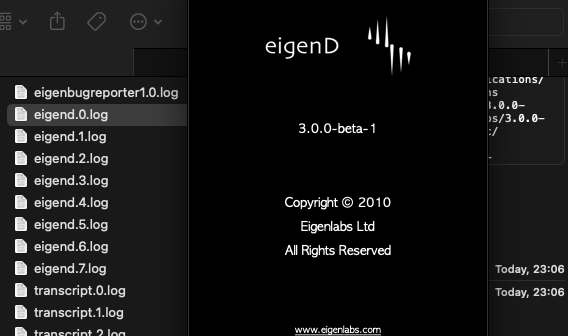
Edit2: Where is the settings/log directory for beta2? For beta1 I had /Users/ferdinand/Library/Eigenlabs/3.0.0-beta-1 but there is no equivalent beta-2 directory. And also no new logs in the beta-1 directory.

ummm possibly on the same place? as it still says beta1
and Im sure I have installed beta 2
Screenshot 2025-11-17 at 23.06.41

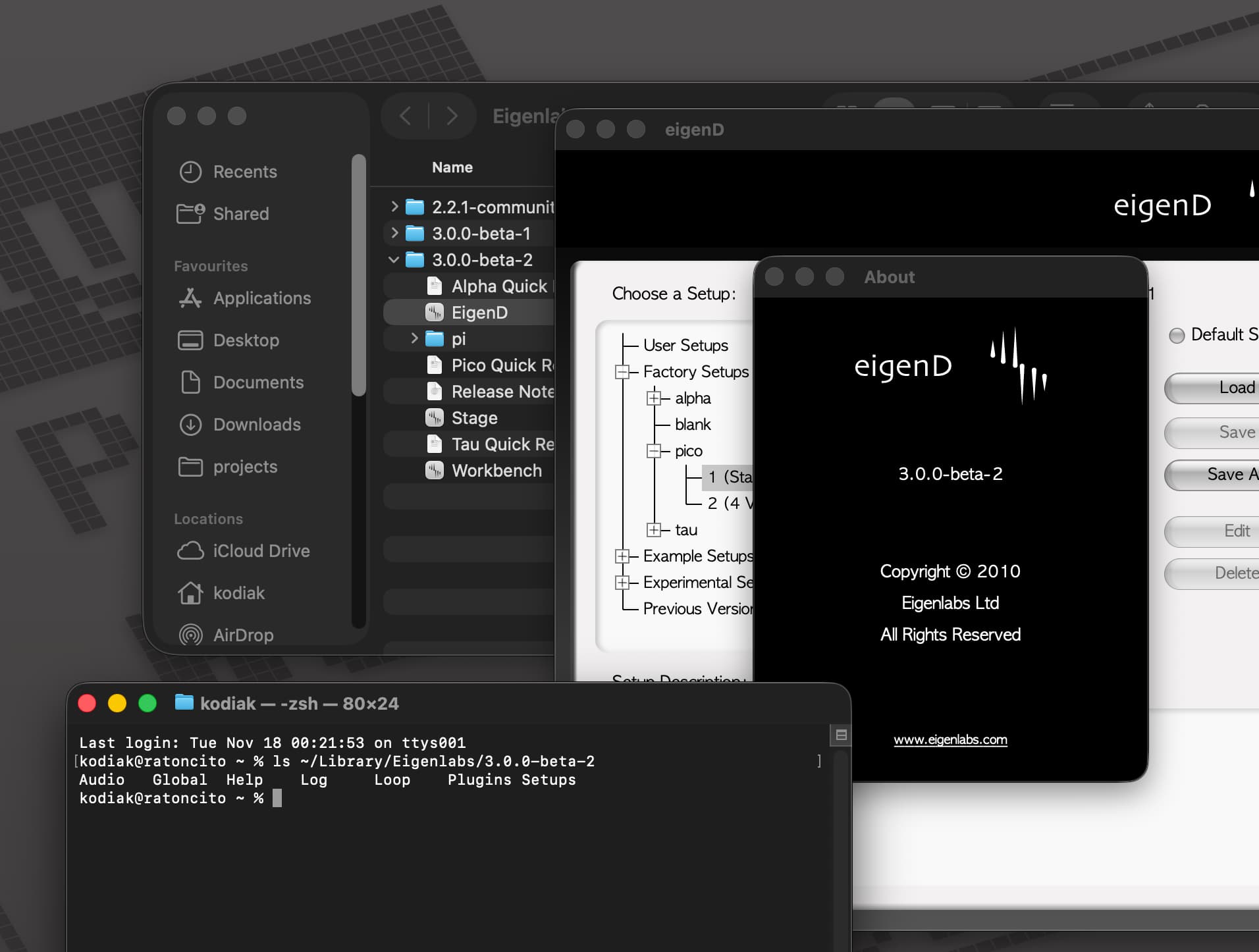
Are you sure you got the right downloading link … and file said beta-2?

I installed it onto my laptop and its all as expected…

(I’ll delete it , and try again…)

EDIT: it’s fine, I just downloaded it again… definitely all correct :wink:

its 100% correct…
note: it will not replace 3.0.0-beta-2 , go into the Applications/Eigenlabs/3.0.0-beta-2

if you run beta 1 logs will go to beta 1, if log beta 2 it goes there :slight_smile: