Good morning everyone, I have an Osmose 61 and I’m pretty happy with it, but I have something that doesn’t sit well with me. Have you tried making the Osmose play with a pre-made Ableton track, for example an old piece of yours to which you changed a new Osmose sound? It doesn’t play because Osmose doesn’t have velocity (in MPE strike), so you have to go into Live’s MPE editor and set all the slides, which is a lot of work. I found a way using the MPE LFO in Live’s expression tab that more or less makes something sound. But it really sucks, better to keep the original sound. Furthermore, when writing with a pencil in the note editor, you have to go into the MPE editor and set the slide every time. Has anyone found anything better??? Of course, the lack of velocity in Osmose, even though it’s designed for the instrument’s expressiveness, is often detrimental.
It’s a pretty fundamental difference between classic piano-based MIDI and MPE, where pressure is the envelope - a continuous dynamically evolving one, instead of launched at a moment’s strike.
MPE isn’t a good fit for traditional piano (percussive strike) model of articulation. Best to pair an MPE instrument with voices designed for MPE actuation.
There are plenty of good controllers designed for traditional percussive actuation, if that’s what you need. Use the right tool for the job.
That said, there is configuration to get something like the clasic piano-style action for use with your old stuff. These kinds of things are well-covered in Richard Kram’s guides. To be sure the Osmose was designed as primarily an expressive controller, and being a do-everything universal controller was never the goal.
This is very clear to me too; I wasn’t criticizing the Osmose for its wonderful functionality. I was just wondering if anyone had found a strategy for writing traditional MIDI notes and having them play on the Osmose without having to manually create slides for each note. For example, I write a score with notation software and want to have it play on the Heaken Matrix without wasting too much time.
ok, so I assume by slides, you mean CC74 (timbre)
(MPE terminology used by Roli, and inherited by Ableton)
so, are you trying to map velocity to CC74?
(as above, Eagan Matrix has no use of midi mpe/velocity)
if so, I dont think Ableton can do this, but you may be able to this by creating your own Max4Live patch ( * )
( * ) with M4L, you can unpack the mpe input, and repack it, so changing velocity to CC74, pressure , or whatever.
I’d say your ‘results’ will be extremely variable as none of the Eagan Matrix presets are expecting this esp. on the Osmose.
frankly, to the point, I think you’d be better off leaving CC74 at 0, and then adjusting it manually where you need ‘accents’ that suit the piece and sound used.
also be aware you may have similar issues with ch. pressure, which is an important part of an sound on the Eagan Matrix.
unfortunately, Ableton’s MPE editing is ‘bare bones’ at best.
If this is important to you, you might want to look at Bitwig which is somewhat better. theres a demo available.
(iirc, Cubase was also much better, but its been a while since I used it)
overall, going from non-expressive midi to an eagan matrix preset may technically work - but they are not really designed for this, it’d require substantial editing to make it sound reasonable (let alone, expressive)
unfortunately, MPE editing is not that popular, as MPE controllers generate a LOT of data, so manually editing them is pretty tedious (outside of correcting a few bad notes of a live ‘performance’)
Ableton was ‘late to the party’, so its not the best at it…
Bitwig / Cubase were in earlier, so are better, but again… MPE editing is still a bit niche.
This… sounds wrong.
Scanning through the manual, it does specify that MPE mode includes velocity, much as the classic midi mode does. It’s only MPE+ that forces 127.
(edit: that was the wrong screenshot. deleting.)
It also specifies that the Haken Port and DIN input accepts MPE as well as MPE+.
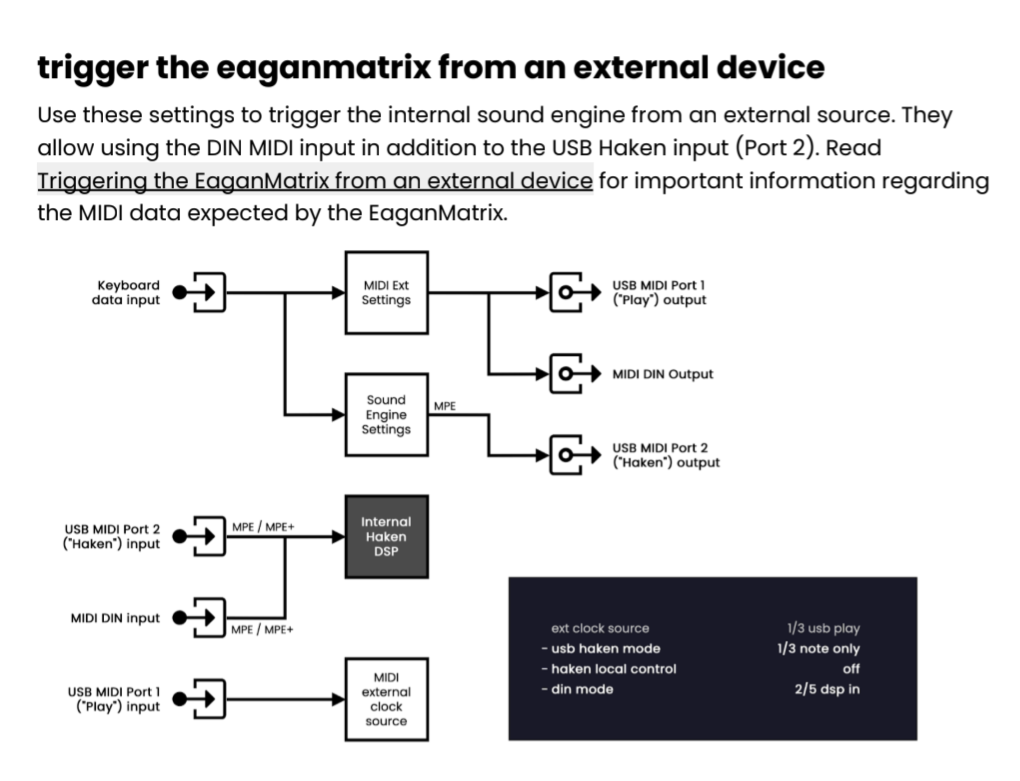
So, it really should “just work”.
Failing that, there should be a simple menu item to configure the input port to one standard or the other. I’m not seeing any, though.
Whatever.
Do you have max for live?
'cause I could just fix it without having to understand why this is happening.
Like so:
https://maxforlive.com//library/device.php?id=14392
(not tested on Osmose yet, but it does work on SWAM instruments with the “MPE Default” midi template loaded)
(Actually, wait. Is Osmose looking for aftertouch or CC74 to start the note? I might have built this wrong. I can add a toggle if needed. Just let me know.)
Thanks to everyone who responded, I solved the problem with the maxforlive patch that greaterthanzero suggested.
Happy music everyone!
its not about understanding (mpe) velocity or not, its about using it.
Eagan Matrix presets use Z & G , they don’t use velocity.
imagine simplest preset - which uses Z as a gain on the output, its not going to produce any sound without Z > 0.
ofc, there are also shape generators (used as envelopes), with can be trigged by G, which might be used for gain - but again they don’t use velocity.
(there are also drones which done use Z/G at all )
so as I said, sure from a technical standpoint you can make Z = velocity at note onset. you’ll get a sound ,
but from a musical perspective…
a) its not how the sound was designed to work, from a sound design perspective
b) from a performance perspective - velocity and pressure are very difference to play.
from a practical side… some patches may work ok, in particular percussive patches that are more likely to use SGs migh the ok.
but still you are loosing so much of what makes the EM expressive / dynamic,
so yeah, not technically an issue (easy transform midi data) , rather one of approach and design.
Id argue there are better (physical modelled etc) soft synths out there (even within Live), that are designed with conventional midi in mind, not sure what EM brings.
however, if the question is more about editing mpe data, Id look at another daw 
EDIT : velocity
to be clear, above is about MPE midi velocity
iirc from experimentations I did a while back, the EM can create something like velocity, using dZ and SH? honestly can’t remember specifics, as was a bit odd.
but the point being, from a sound design perspective, you can have a dynamic ‘strike’ element. just its not tied to midi velocity, but derived from Z/G.
Awesome! Glad that worked out.
There’s a new version up.
What you had before was good for previewing a MIDI clip that doesn’t have pressure data, but if you then decided to add pressure through the MPE tab, you’d have to turn off the device and add pressure to every note, exactly as before.
New version’s more flexible. Now, you can casually add pressure to a few notes here and there, and it will only inject the velocity based pressure value where needed.
…at least, in theory.
(“Garbage in, garbage out”, as they say.)
Here are the weird edge cases that might make things less predictable:
-
if you have an automation point somewhere other than the beginning of a note, make sure there’s also one at the beginning. Otherwise, it will start with our velocity based value, then jump to where you clicked when the playhead reaches that point.
-
if the automation point at the beginning has a value of 0, we don’t actually use that to suppress the velocity hack (because Live itself sends a 0 when no pressure is established). So, don’t rely on only that keyframe. Draw a second one later, or make the first one a 1 instead of 0.
But of course, if you’re just using velocity and not drawing in any additional pressure automation, these warnings are unnecessary.
For all other users who want to understand how the Osmese works when it receives a non-MPE midi, I suggest this video by Tim Shoebridge https://youtu.be/qQ45Ypdx50M?si=DtQ6UtrGdcEBLAD9 …he uses a Voltage modular module to modify the midi input to the Osmose, although the max4live patch by greaterthanzero was very useful to me.