Hm, what are the nominal system requirements? I get an uninformative “you can’t use this version of the application with this version of the O/S” popup.
Looks like macOS 13 is the realistic minimum, so I made some new release builds for that, gave it a quick test on my Mac and replaced the release zip in GitHub.
I’m just finding my way around, so it’s entirely possible I’ve got some wrong ideas about how to use it, but here are some tentative feature requests, if that’s ok?
Preset switch action: could it simultaneously send a MIDI message, to help keep everything in sync? Alternatively, could a preset have an on-load action?
Note action: could it have a provision allowing for virtual strings, either (a) an optional fixed channel on each key, or (b) a set of four additional “secondary zones” under one or more of the main zones that can share everything with their primary except their channel and transpose settings.
MIDI msg action: Could there be a second kind of Ctrl change option that sets a playing key up as an X-Y pad, sending a pair of analog CCs (ideally with an Abs/Rel suboption)?
Ideas and feature requests are most welcome. All of these are very good and fit the ECMapper “concept” perfectly. Now I want them, too!
I’ll add one of my own:
Omnichord-inspired mode where one set of keys define chords, another set triggers them. E.g. left hand press a key for A minor, the right hand strums percussion keys to trigger the notes.
I have released a “v2.1” with an attempt to include the ideas that @sps had + some of my own. I find having a metronome routed to the Tau and Alpha headphone very convenient and have been using that a lot since I added it. But the feature I personally enjoy the most is the ability to press multiple chord keys and then “pluck” the notes of those keys from the percussion keys. I didn’t really realise how much I’d like that way of playing until I actually tested it!
I own an Expressive E Touché and we use that quite a lot in our music. Controlling Lié (the software for the Touché) from the Eigenharp with a “Touché key” works well, so I expect to be using this quite a bit, too. I´m not sure if Lié is sold separately, though…
Anyways, still only tested on Pico and Tau. Probably bugs I didn´t catch, so bug reports are welcome. If there is anything serious I have missed I will try to fix that soonish. Otherwise, I don’t expect to add anything new to this for some time.
this is similar idea to the ‘strummer’ agent in EigenD - no?
i.e you use the main keys as notes, and then the percussion keys are the strings.
id need to check, but I think strummer was pretty much this (i.e. voice selection), and it was stringer that made a coarse a voice, so combined they gave the guitar function.
anyway, nice to have it without having to rewire agents
doesn’t look like it, look like its the same as Ctrl-E its licensed with the hardware.
Im not sure how they handle it if you sell that hardware, must be some kind of transfer I guess.
on a slight tangent, I was actually looking at the midi messages sent by the Osmose for Ctrl-E, and its trivial to get the Eigenharp to send these
so you can navigate ctrl-e presets , and also interact with the ctrl-e surface scripts e.g. to change daw track, mute etc.
I think this will become even more interesting when (inevitably) Osmose has haken overlays within Ctrl-E…
Yes, kind of. You can set things up to work similar to Strummer. I’m not sure if ECMapper can do everything that Strummer can, though (I too need to refresh my memory). But the way of playing I enjoy the most right now is a bit different. Instead of defining strings, a single chord key can define up to six notes. Those notes automatically get mapped to strumming keys. The plan was to mimic an Omnichord, but I liked it more when I started combining multiple chord keys at once. Example:
Key 1: C1, G1, E2, C3
Key 2: D1, A1, F2, D3
If you hold down both keys, you’d get
C1, D1, G1, A1, E2, F2, C3, D3 in that order on strumming key 1-8. If you added another chord key, those notes would be mixed into what would now be 12 notes that can be triggered by strumming keys. It would probably sound bad strummed like a guitar, but playing around with this I tend to discover interesting melody lines and arpeggios.
Hmm, shame. It is nice to have lots of Lié presets that “just work”, even though it would be possible to recreate the same sounds without it. I don’t own an Osmose, but after a quick look at Ctrl+E I would probably have liked it for the same reasons…
that sounds similar to strum i.e.hold chord on main keys (set pitch), but the trigger is the percussion keys.
however…
sounds more like ‘predefined chords’…
which would be really good with an arp
But, I’ll go download 2.1 and give it a go - Im sure it’ll make immediate sense then…
yeah, I think this is something Expressive E understand really well with their ‘expressive suites’ etc…
a lot of people don’t want to be sound designers, they want to use presets and perhaps just ‘tweak a bit’… esp. these days when most synths come with 100s of presets.
I seem to have a bug where string assignments behave as global to all presets (that is, I change in one preset and the other presets change too).
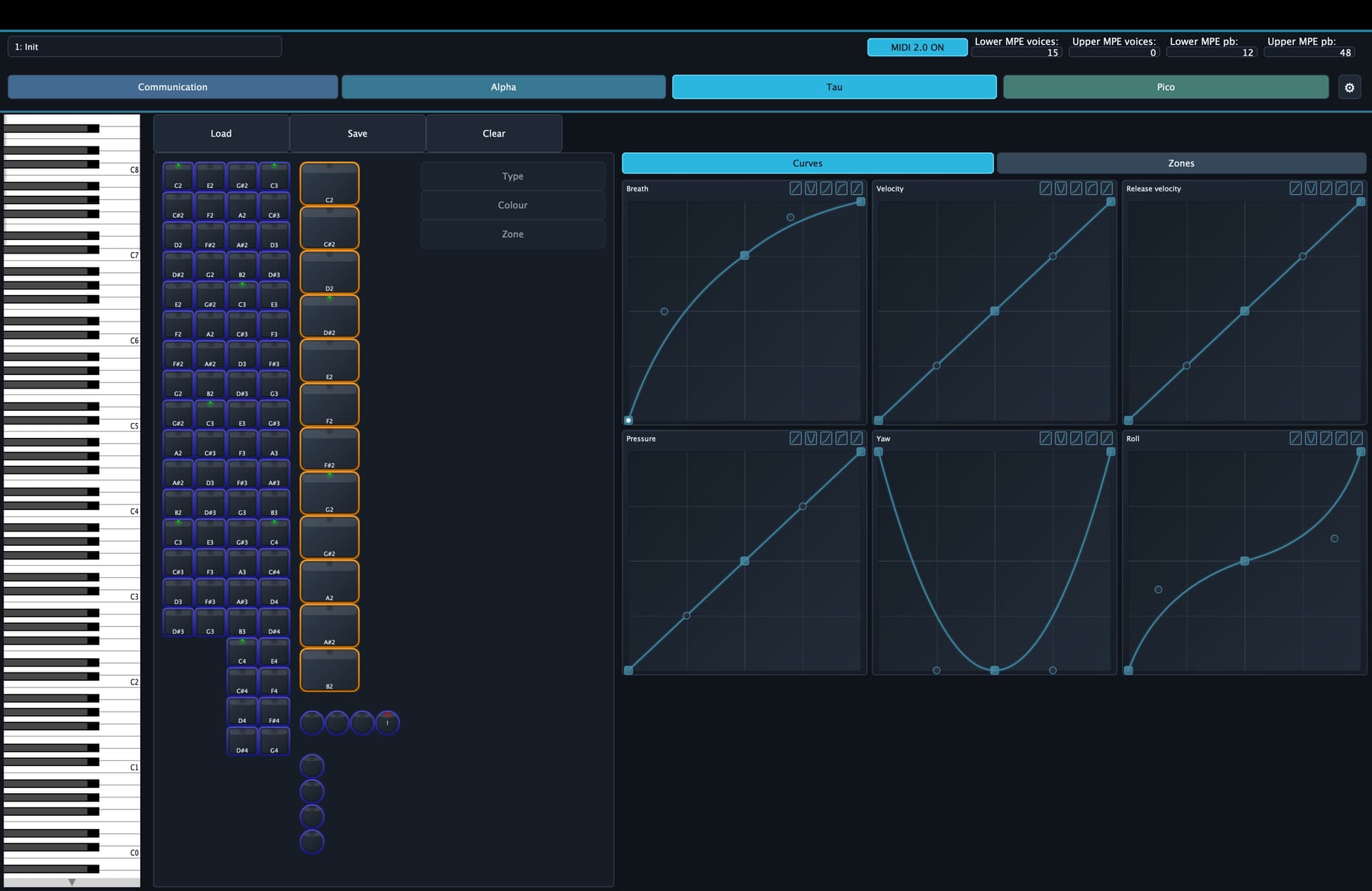
And future quality of life request (though I’m sure you’re ahead of me): multiselect in the UI, so I can take a block of keys and change their type, zone, string, colour (works as a map: the setting has entries for was off, was red, was green each of which can be set to off, red, green, …), root (works as a transposition) and possibly scale in bulk. Then a lot of setups, at least the playing areas, would take only a minute to make.
I tried to reproduce this one and found a bug. Not sure it is the same, but if I have a key with an assigned string selected and load another preset, then the UI is not refreshed with the string setting of the new preset. If you refresh the UI by for instance selecting some other key and then go back, the string setting is showing correctly. Does that sound like what you found, or might there be something more serious going on?
Yeah, agree. Creating layouts is a chore. You can use cursor keys to navigate and a connected midi keyboard to assign notes, but a lot could be done to improve this. Multiselect with the options you suggest + copy and paste would help a lot. I also notice I miss copy/paste for the expression curves.
a bit different… but the way I handle this in EigenHost see this post , was to allow users to ‘paint’ the layout.
I’ll admit the reason I went this way is Im lazy , I got bored very early on in EigenD defining the keygroup layouts by hand - so quickly defined script that would generate them for me!
I had realised that most note layouts can be defined as vertical / horizontal offsets between ‘cells’. very few user ‘arbitrary’ notes (except for Antonio ), so this is a quick way to define a layout If you know the starting point/note.
I used that approach for MEC, and with EigenHost I take that further, so basically, you have the offsets define and if you ‘paint’ a region it uses the starting note to infer all other notes.
its not fixed at all, you can chose to paint the whole thing, or just a row or column…
ofc, I also allow you to specify a particular note too…
the ‘paint’ is just a generator… I store individual notes (actually, I store offset/intervals, but thats for scale abstraction), so a user can still have any layout they want… just quicker to setup new ones.
as for types e.g. notes vs app control
my current (internal,wip) approach is to use zones
this is a bit like EigenD where usually you put not musical keys into a different keygroup. so in EigenHost you’ll define a new zone, then target the app control output.
that said you have a lot more functionality in this area, and Im not sure how Id extend my model to cover all of this…
I’d guess basic idea is that the zone editor / painter will need to paint different types ?! e.g. control vs notes?!
anyways, not suggesting this is a good route at all, rather it might provide some ideas…
I certainly have been inspired by ECMapper for ideas for EigenHost


 , I got bored very early on in EigenD defining the keygroup layouts by hand - so quickly defined script that would generate them for me!